
MarketTime Integration
Automatically import wholesale orders from MarketTime into Zoey
MarketTime Overview
Use the MarketTime data mapper integration to import rep-driven wholesale orders into your store automatically.
- Import wholesale orders automatically from an SFTP server.
- Match orders to existing Zoey Accounts by their retailer name.
- Billing email CC'd if doesn't match a Zoey customer.
- Set mapped payment and shipping values during import.
Key Details
- Products are allowed to be backordered by the MarketTime integration. Product stock can dip into negative quantities through the order import. Backorders are allowed by default even if the product does not allow itself to be backordered by customers normally.
- Orders can also be split upon import into Zoey. Learn more here.
- The
retailerNamecolumn of the MarketTime export will be matched against existing Accounts by Name. If the match is found, it will be set on the Order. If not matched, thebillToEmailwill be added as an additional order email address so the customer gets all email notifications. - Discount Rules setup in Zoey can apply automatically. To determine the final price of an item during Order import, the
itemDiscountwill be subtracted from theunitPrice. Zoey's own Discount Rules will apply on top of the resulting price.
Setup the MarketTime Integration
1. Connect to SFTP server
Go to Integrations (puzzle-piece icon) and open MarketTime to click Add Connection, then enter your SFTP credentials.
2. Configure the import settings
Configure the general import settings:
- Debug Mode = Yes will provide more detailed logs, but can also cause longer processing time.
- After Import Action lets you move the order file to a different SFTP folder after its been processed.
- Send Error Email will send notifications to the listed email address if errors occur.
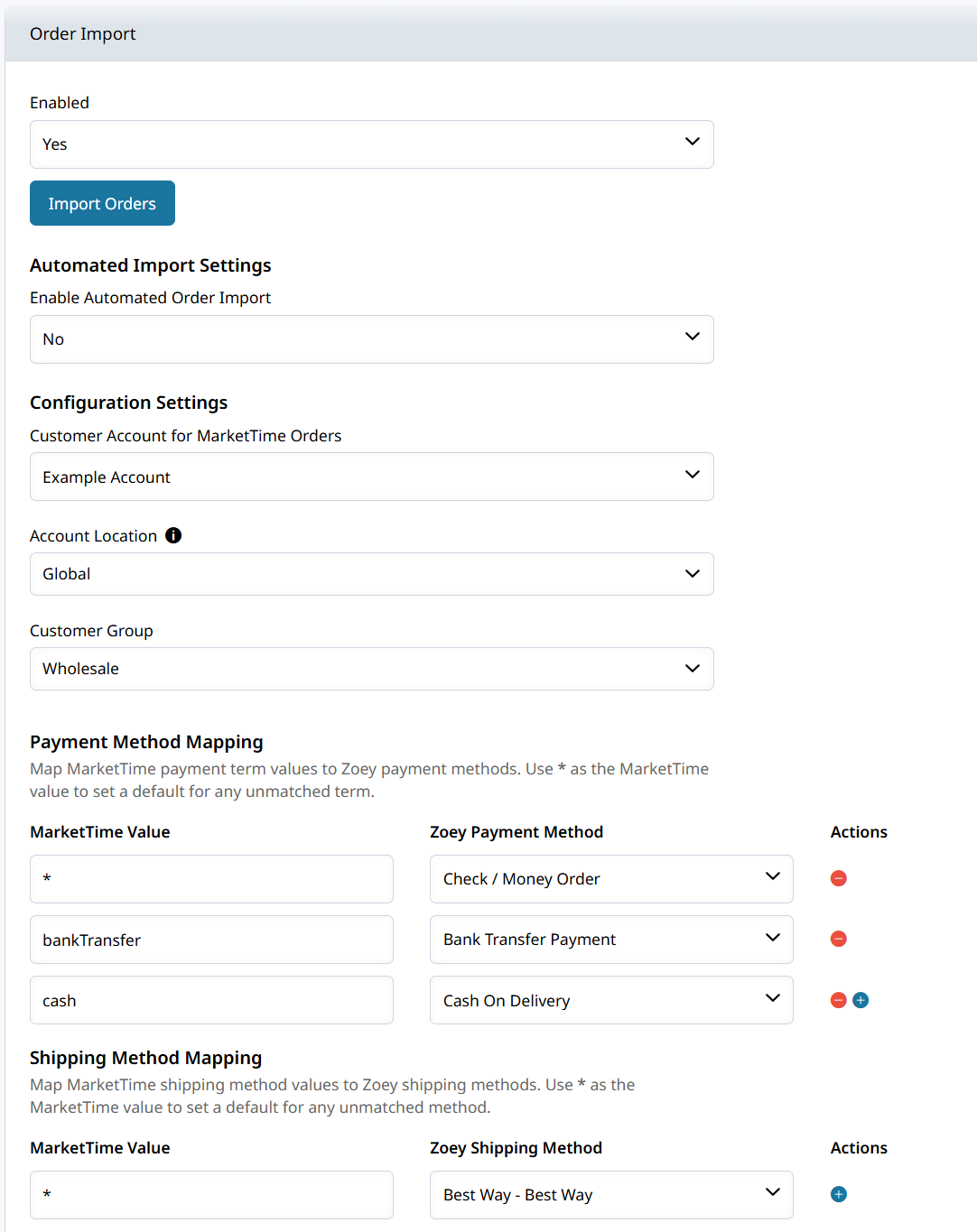
Choose the default Account to use when imported data does not match an existing record:
- Default Account
- Account Location
- Customer Group
The
retailerNamecolumn of the MarketTime export will be matched against existing Accounts by Name. If the match is found, it will be set on the Order.If the Account's main contact's email does not match the provided
billToEmail, or a matching Account is not found at all, thebillToEmailwill be added as an additional order email address to ensure that the customer gets all email notifications.
Payment Mapping
Map each MarketTime payment value to the corresponding payment method's label in your Zoey store.
- Set a default payment mapping for any miscellaneous payment terms.
- Map common payment terms to Zoey Payment Methods.
Net Terms will set the Account's default terms on the invoice so first enable Net Terms for the Account.
Shipping Mapping
Map each MarketTime carrier or service value to the shipping method used in your store.
- Set a default shipping method for unmapped values through the wildcard
*. - Review all ship values in your logs and add explicit mappings if they appear often.
Shipping methods will calculate and add their shipping amount to the order.
Mapping Additional Fields
Map CSV column names from the MarketTime file to Zoey order attribute codes. This is where you can pass extra data fields from MarketTime into your Zoey Order.
3. Running the Import
- Set your Schedule (Recommended)
Scheduled imports run in the background and are better for large volumes.
- Manual Import (Testing)
Use manual imports for testing small batches only. Large batches may time out.
Account Matching
The integration matches Retailer Name to existing Accounts through their Account Name.
The match is not case-sensitive and trailing/leading spaces are stripped.
| Scenario | Result |
|---|---|
| Match found | The order links to the matching account and its default contact. |
| No match | The import uses the default account and adds a private note. |
Billing Email on the MarketTime export is CC'd as an Additional Order Email so they're always recipients of the Zoey Order notifications.
Updated about 2 months ago