
Account Order Guides and Wishlists
Compare Account Order Guides, Quick Order Forms, and category-based ordering options, then configure shared Account Wishlists and Contact Role Permissions.
Give customers product lists for quick purchasing and reordering through shared Wishlists, Order Guides, Quick Order Forms, or category-based ordering pages.
An Account Wishlist is a saved list of products shared by Contacts on the same Account that can serve as an Order Guide. Store Admins can manage its products, while Contacts can view and modify the shared list according to their Role Permissions. Contacts who belong to multiple Accounts can switch Accounts to access each Account's Order Guide.
Order Guide describes the broader ordering experience; Wishlist identifies the saved-list feature, not Quick Order Forms or category-based product lists.
Order Guides can take on different forms and functions!Order Guides can range from shared Wishlists to editable Quick Order Forms or category-based product lists. Choose the option that fits how your customers order.
Order Guide Types and Options
Choose the option that matches how you want to maintain the product list and how customers will order from it. The linked guides provide setup instructions for each option; the sections below cover using an Account Wishlist as an Order Guide.
| Option | Overview | Setup instructions |
|---|---|---|
| Wishlists | Saved product lists for quick purchasing and reordering. Account Wishlists provide a shared list for Contacts on the same Account. | Enable Account Wishlist |
| Quick Order Forms | Configurable order-entry forms with predefined product lists or SKU entry. Customers can edit and save their own versions when enabled. | Quick Order Forms |
| Category-based product lists | Theme product lists populated from Categories or filters, with optional Table View. Multiple lists can be combined on one ordering page. | Product Lists, Product List from Categories, and Category Table View |
| Ordered Items | A list of previously purchased products that customers can review and reorder. | Adding an “Ordered Items Page” Link |
These options use different sources for their product lists. Quick Order Forms can allow customers to save their own versions for their individual Contact, separate from the shared Account Wishlist. Category-based product lists use configured Categories or filters rather than a Contact-maintained saved list. Account Wishlist Role Permissions apply only to the shared Account Wishlist, not to these separate ordering options.
For more specific ordering workflows:
-
See Creating an Order Form by Category or Creating a Custom Order Form Page to combine category-based product lists into an ordering page.
-
Use Quick Order Form by Unique Product Lookup to look up products by a unique identifier instead of SKU.
-
Use Configurable Product Table Order Interface to order multiple variations of one Configurable Product from a table.
-
See My Catalog for B2B Sales Portal for the theme-specific presentation of Order Guide functionality, or B2B Sales Portal Theme for theme setup that includes Quick Order and My Catalog.
Enable Account Wishlist
Use an Account Wishlist as an Order GuideBoth settings below must be Yes to use a shared Account Wishlist. The admin setting names refer to Wishlist even when your storefront calls it an Order Guide or "My Catalog".
-
Go to Web Settings > Product Settings > Wishlist & Compare.
-
Configure the following settings:
Setting Configuration Enable Wishlist Set to Yes to enable Wishlist functionality. Enable Account Wishlist Set to Yes to share the Wishlist at the Account level. Disabled by default.
When Enable Account Wishlist is No, each Contact has their own Wishlist instead of a shared Account Wishlist.
Configure Wishlist Role Permissions
Account Role Permissions control access to the shared Account Wishlist when Enable Account Wishlist is Yes. Contacts on the same Account can have different levels of access depending on their assigned Role.
The following permissions are available when adding or editing a Role in Customers > Roles & Permissions:
| Permission | Description |
|---|---|
| Can View Wishlist | View the Account's Order Guide. |
| Can Add to Wishlist | Add products to the Account's Order Guide. |
| Can Edit/Comment on Wishlist | Edit products and comments on the Account's Order Guide. |
For instructions on creating Roles and assigning them to Contacts, see Account Roles & Permissions.
Manage an Account Wishlist from the Admin
Admin users with the appropriate Customer editing permissions can manage saved products in the Account's Wishlist tab under Customers > Accounts.
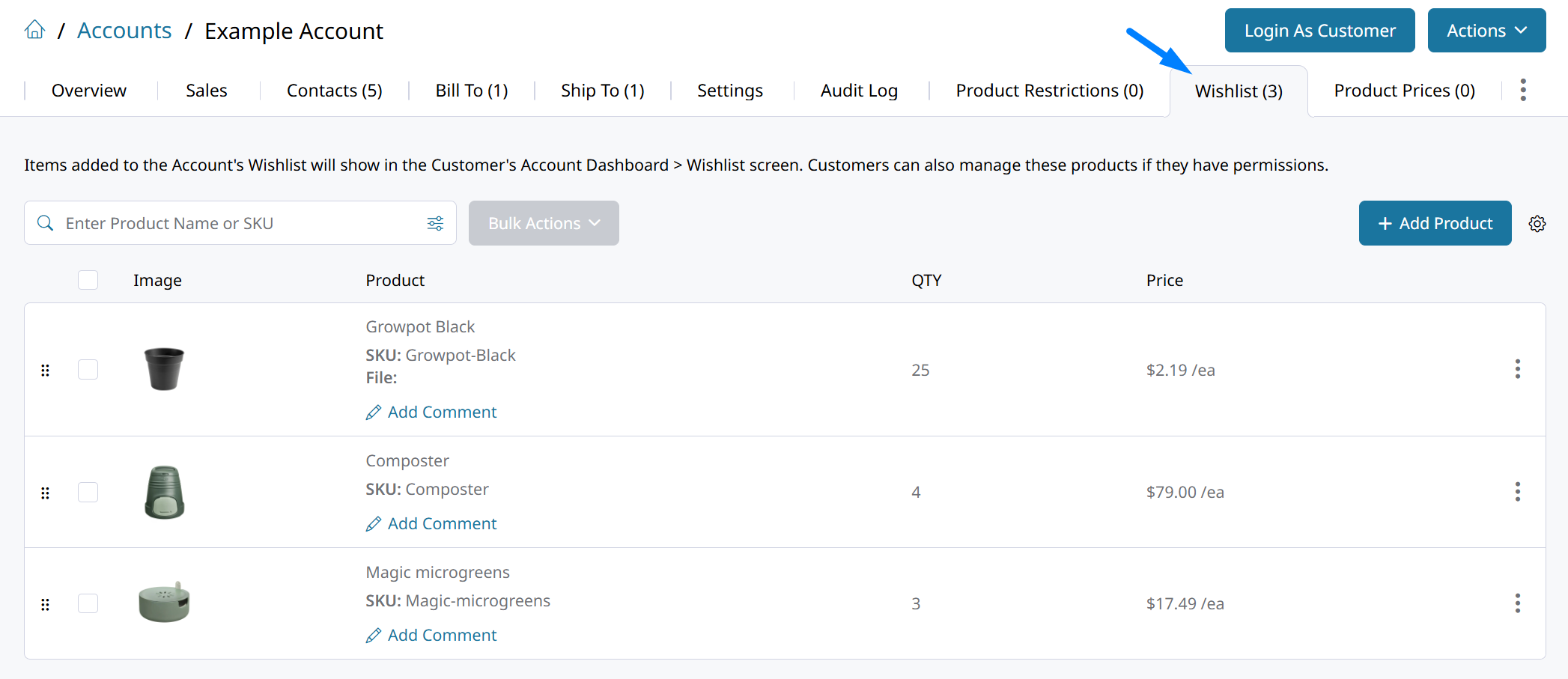
Admin view: the Account's Wishlist tab under Customers > Accounts. Use the settings path and action table in this section if your interface differs from the screenshot.
| Action | Description |
|---|---|
| Add Products | Search for and add products to the Account Order Guide. |
| Edit | Edit an existing product on the Order Guide. |
| Comment | Add or modify comments on a product. Contacts can view comments with Can View Wishlist permission and edit them with Can Edit/Comment on Wishlist permission. |
| Delete | Remove a product from the Order Guide. |
| Bulk delete | Select multiple products and remove them together. |
The Admin Wishlist tab and the storefront Order Guide use the same saved product list for that Account. Changes made by Admin users with Customer editing permissions are reflected on the storefront; changes made by Contacts with the required Wishlist Role Permissions are reflected in the Admin Wishlist tab. Sharing the list does not give Contacts Admin editing permissions.
Use the Account Order Guide on the Storefront
Contacts with Can View Wishlist permission can access their Account Order Guide from the storefront. Depending on their Role Permissions, they can:
- View saved products.
- Add products to the Order Guide.
- Edit quantities and comments.
- Remove products.
- Add saved products to their Cart or a Quote.
- Move products from the Cart to the Account Order Guide.
Changes to the Order Guide are shared with other Contacts on that Account, subject to their permissions. Actions labeled Wishlist work with the selected Account's shared list when Enable Account Wishlist is Yes.
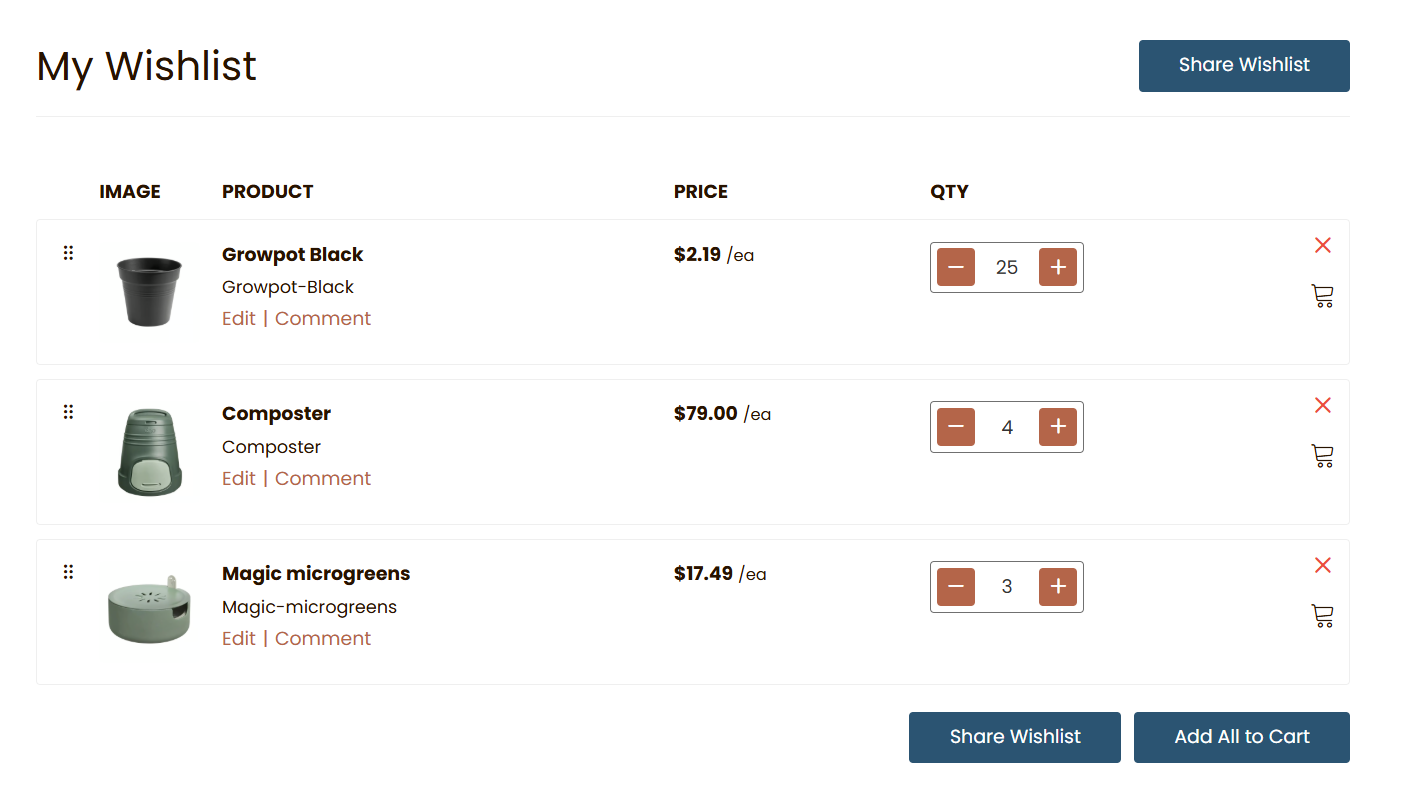
Storefront view: the selected Account's shared Order Guide. Labels and layout may vary by theme; available actions depend on the Contact's Role Permissions.
Contacts on Multiple Accounts
When a Contact switches Accounts using the Account Switcher, the Order Guide displays the saved products belonging to the selected Account.
Each Account's Order Guide remains separate. Adding or changing products on one Account's list does not affect another Account's list.
See Account Switching for instructions.
Optional: Customize Wishlist Labels on the Storefront
When your Order Guide uses Wishlist functionality, your theme may label it Wishlist, My Catalog, or Catalog. Changing the label does not change how the saved list works.
See My Catalog for B2B Sales Portal for theme translation instructions.
Updated about 7 hours ago