
Search and filter the Products list
Search products by name, SKU or description, or build Advanced Search filters on any attribute.
Find products in the Products list by name, SKU or description, or filter the list by any attribute.
Where to find it: In the Zoey Admin, go to Products > Products List. The search bar and Filters are at the top of the list.
Search
- Click the search bar at the top of the Products list.
- Type part of a product's name, SKU or description. The list starts filtering as you type.

Type something specific (a full SKU, for example) to narrow the results.
Advanced Search
Use filters to find a set of products by attribute, for example every red or blue shirt over $10.
- Click Filters next to the search bar.
- Pick an attribute, a rule (such as Is Equal to, Contains or Is Greater Than) and a value.
- Add more rules and choose whether each one is AND (must also match) or OR (either can match).
- Apply the filter. To keep it for later, save it as a tab (see Use Products list tabs).
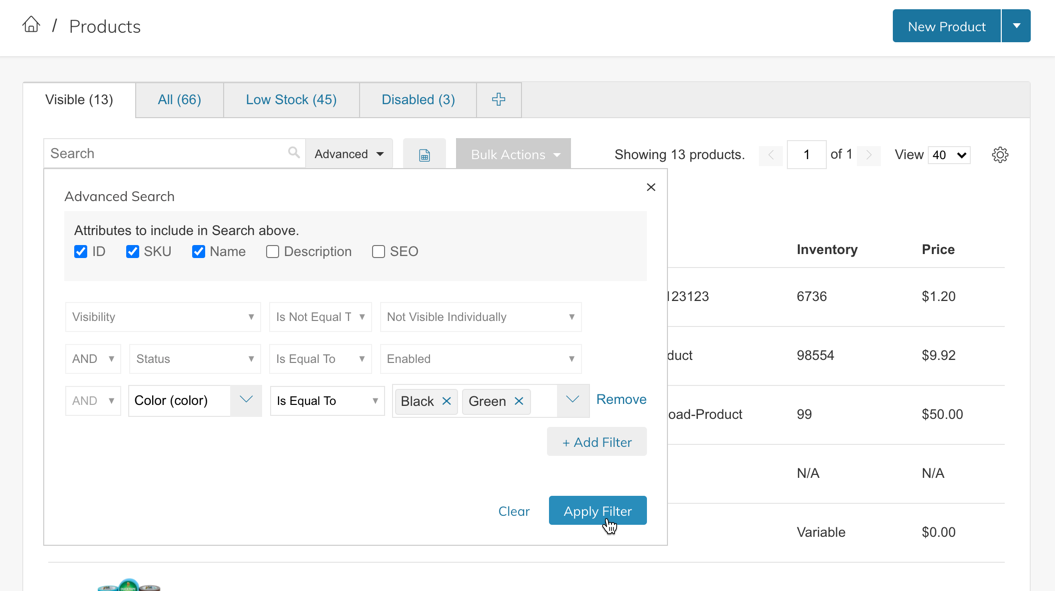
Color Is Equal to "Red" OR "Blue", AND Name Contains "Shirt", AND Price Is Greater Than "10.00"
To find a product, order or Account from any admin page, press Ctrl K (Cmd K on Mac). See Search Everything from One Bar (Global Search).
Ask Zoey AIAsk a question instead of building a filter. In the Zoey Admin, press Ctrl + J (Cmd + J on Mac) and ask, for example:
- "Which products haven't sold in 90 days?"
- "What's low on stock?"
Related articles
Updated about 8 hours ago
Did this page help you?