
Accounts by Orders Total
See which Accounts ordered the most in any period: number of orders, average order, total order amount and items ordered.
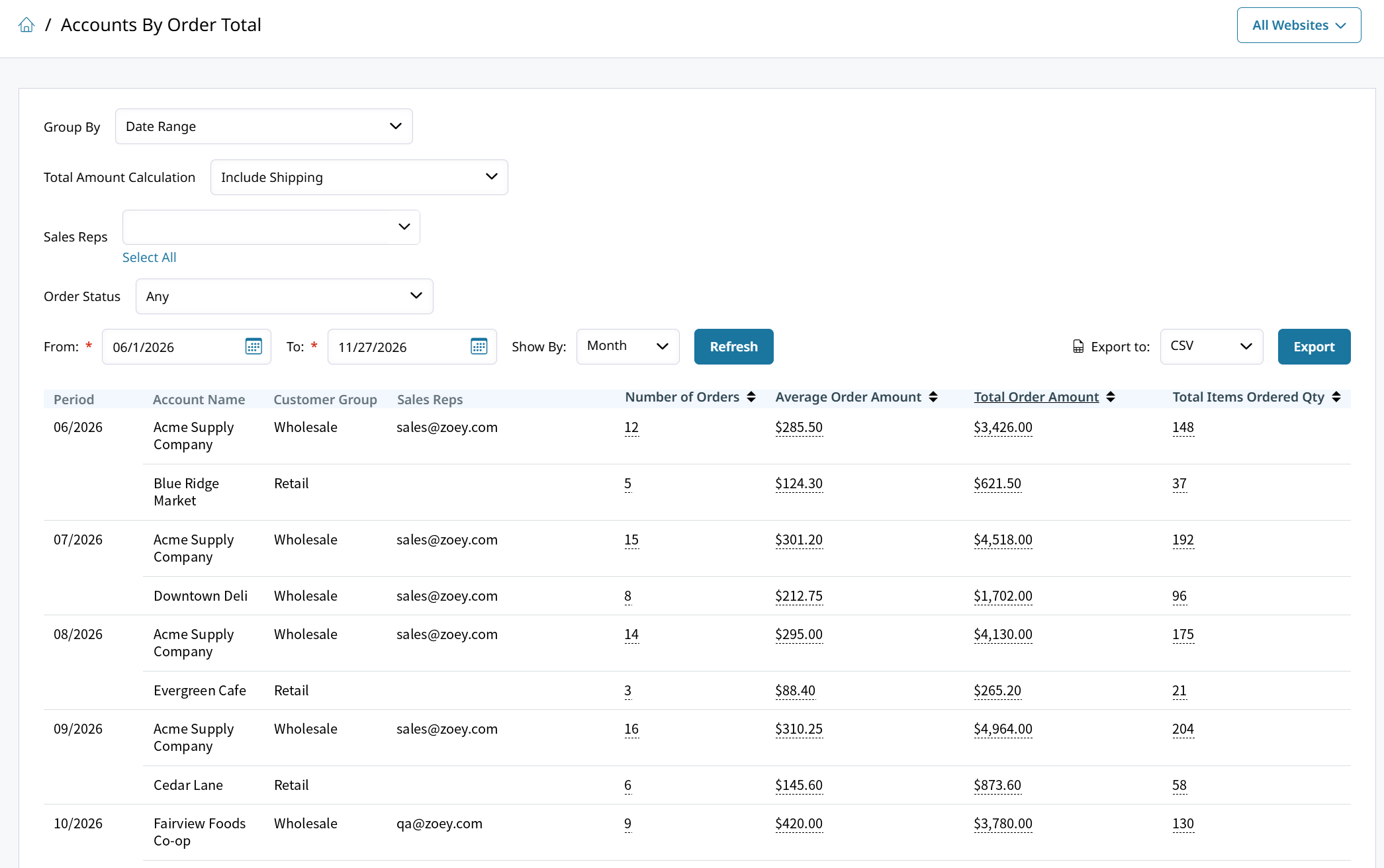
The Accounts by Orders Total report shows how much each Account ordered in a period, with their number of orders, average order amount and items ordered.
Open the Report
Go to Reports, type "accounts by orders" in Find a report, and click Open next to Accounts by Orders Total. It's in the Accounts category.
Set the Filters
| Filter | What it does |
|---|---|
| Group By | How rows are grouped. Date Range lists the Accounts under each period. |
| Total Amount Calculation | Which amounts make up Total Order Amount, for example Include Shipping. |
| Sales Reps | Counts only Accounts with the sales reps you choose. Leave it empty, or click Select All, to include every rep. |
| Order Status | Any counts orders in every status. Choose statuses to count only those orders. |
| From / To | The first and last day of the report. Both are required. |
| Show By | Splits the results by Day, Month or Year. |
If your store has more than one website, choose one in the All Websites menu in the top right, or leave it on All Websites to include every website.
Click Refresh to run the report.
Report Columns
| Column | What it shows |
|---|---|
| Period | The day, month or year |
| Account Name | The Account |
| Customer Group | The Account's customer group |
| Sales Reps | The Account's sales reps |
| Number of Orders | The number of orders the Account placed |
| Average Order Amount | Total Order Amount ÷ Number of Orders |
| Total Order Amount | Subtotal - canceled subtotal - subtotal refunded by credit memos - discount amount - canceled discount amount. Total Amount Calculation decides whether shipping is added. |
| Total Items Ordered Qty | The number of items the Account ordered |
All amounts are in your store's base currency.
Click a column title with arrows (Number of Orders, Average Order Amount, Total Order Amount or Total Items Ordered Qty) to sort by it, for example to rank your Accounts by Total Order Amount.
Click any underlined number to open the orders behind it.
Export the Report
Choose a format next to Export to and click Export.
Ask Zoey AI
Click Ask next to Accounts by Orders Total on the Reports page, or press Ctrl+J (Cmd+J on Mac), and try:
- "Who were our top 10 accounts by order total this year?"
- "Which accounts ordered less this quarter than last quarter?"
Updated about 6 hours ago