
Sync Account Attributes to Klaviyo Profiles
Sync Default Account Attributes to Klaviyo
Zoey can sync Account Attribute values from a Contact’s Default Account to their Klaviyo Profile as Custom Properties.
The Contact must have a Default Account assigned. When a customer registers and creates an Account, that Account is automatically set as their Default Account. You can also change the Default Account from the Account or Contact screen in the Zoey Admin.
Enable the Sync
- Open the Klaviyo integration settings in Zoey.
- Enable Default Account Attribute Sync.
- List the Account Attributes you want to sync.
- Save the settings.
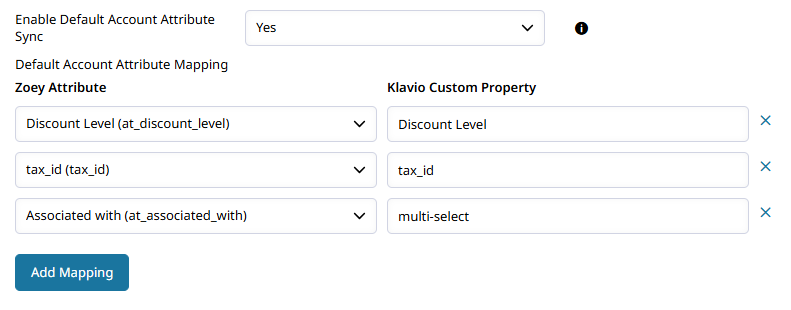
The listed attributes will be added to the Contact’s Klaviyo Profile automatically. You do not need to create the Custom Properties in Klaviyo first.
For example, an Account Attribute named Primary Business Activity with a value of Retail will appear as a Custom Property on the Klaviyo Profile.
Only attributes from the Contact’s Default Account are synced. Contacts without a Default Account will not have Account Attribute values sent to Klaviyo.
The sync runs once per day with the other Klaviyo syncs. After the properties are added, you can use them to build Klaviyo segments, campaigns, and flows.
Updated 3 months ago