
Turn on infinite scroll for search results
Add a script in Manage Assets so more search results load as shoppers scroll.
Overview
Infinite scroll (also called Ajax lazy load) loads more products as the customer scrolls down your search results page, instead of showing page numbers. It's off by default: search results show page links (1, 2, …).
For category pages, see Turn on infinite scroll for category pages.
Turn On Infinite Scroll for Search Results
- In the Zoey Admin, click Theme, click the gear icon at the top right, and select Manage Theme Assets.
- In Site code & files, click + Add and select Write new code.
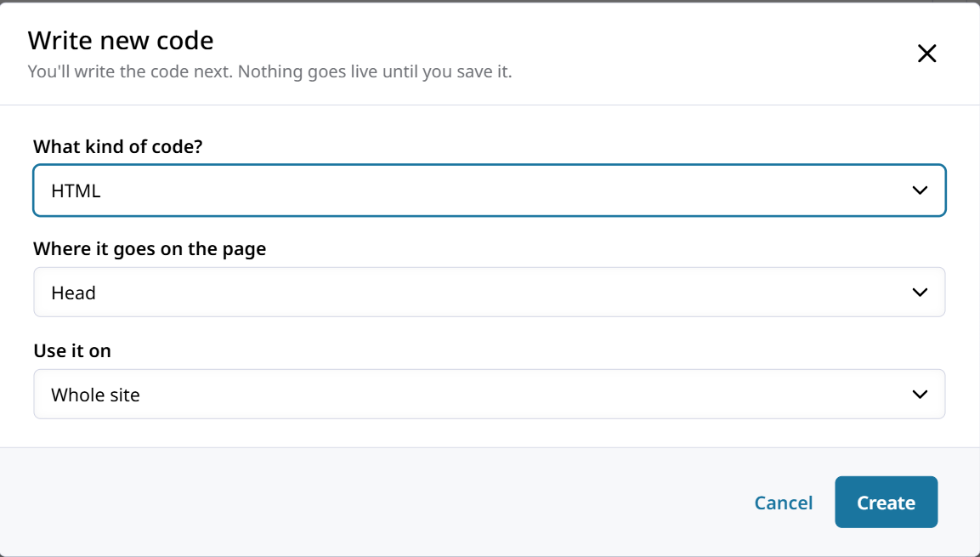
- Set What kind of code? to HTML, leave Where it goes on the page as Head and Use it on as Whole site, and click Create.
- Click Edit code, replace the placeholder with the code below, and click Save & close. It goes live as soon as you save.
<script>
  var klevu_enableLandingAutoScroll = true;
</script>- Search on your storefront and scroll down the results: more products load at the bottom and the page links are gone.

Already have a Head file?If Head is already listed under HTML in Site code & files, open it, add the code at the end with Edit code, and click Save & close instead of creating a new one.
To turn infinite scroll off again, delete the code (or the Head file you created) and save.
Updated about 1 hour ago
What’s Next
Did this page help you?