
AutoPay Transactions Report
See the payments AutoPay collected and the invoices that failed to pay automatically, by day, month or year, then export the results.
The AutoPay Transactions report shows the payments AutoPay collected on your invoices, and how many invoices failed to pay automatically, for any period.
Which payments are countedThe report counts only completed AutoPay payments. Manual payments, pending ACH payments and voided payments are left out.
Before You Start
- Turn on AutoPay in Orders > Settings > AutoPay. Set Enable AutoPay (Admin), Enable AutoPay (Storefront) or both to Yes. See AutoPay.
- Turn on AutoPay and choose a saved payment method for each Account that should pay automatically. See Customer AutoPay Settings.
AutoPay tries to collect payment once an invoice's due date plus the Account's grace period has passed, so the report only shows activity after that.
Run the Report
- Click Reports.
- Type "AutoPay" in Find a report, or click Payments & Tax.
- Click Open next to AutoPay Transactions (Payments).
- Set the filters and click Show Report.
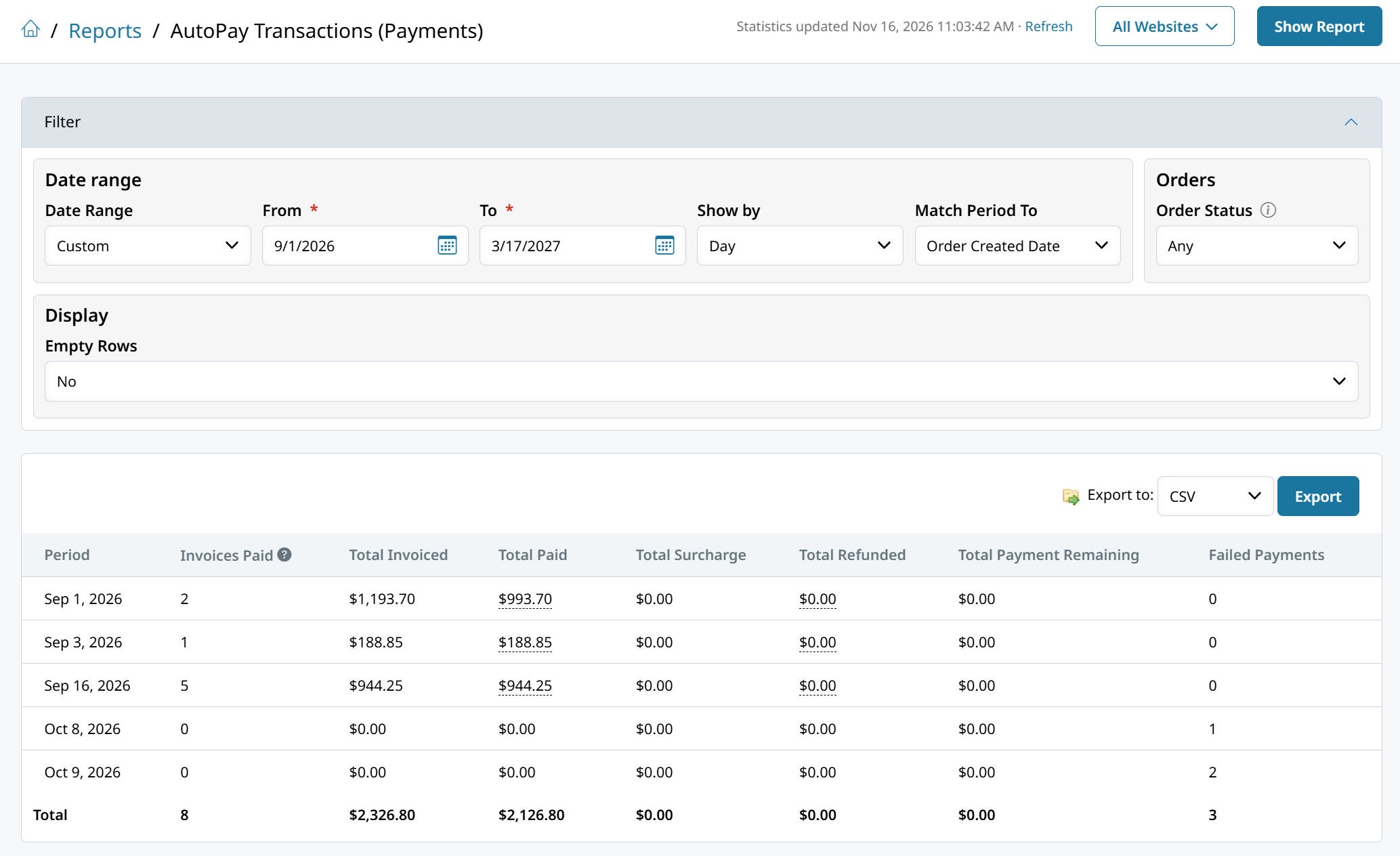
Use Match Period To to count each payment by its Payment Created Date or by its Order Created Date. For what the other filters do, see Running Reports with Zoey AI.
Report Columns
The report shows one row per period. These columns are specific to AutoPay:
| Column | What it shows |
|---|---|
| Invoices Paid | The number of invoices AutoPay collected payment on, including invoices that were only partly paid |
| Failed Payments | The number of invoices AutoPay couldn't collect payment on. Each invoice counts once, however many times the payment was retried. |
To see which invoices failed, go to Orders > Invoices and open the AutoPay Failed tab.
Export the Report
In Results, choose CSV or Excel and click Export.
Missing recent payments?Click Refresh Statistics at the top of the Reports page. See Refresh Report Statistics.
Ask Zoey AI
Click Ask next to AutoPay Transactions (Payments) on the Reports page, or press Ctrl+J (Cmd+J on Mac), and try:
- "How much did AutoPay collect last month, and how many invoices failed to pay?"
- "Which accounts had AutoPay payments fail this month?"
See Running Reports with Zoey AI.
Other Ways to Review AutoPay
- Orders > Invoices: the AutoPay and AutoPay Failed tabs list invoices set to pay automatically and invoices whose payment failed.
- Each invoice shows when AutoPay will collect payment and any failed attempts.
- Orders > Transactions: filter the grid and use Export Current Grid to export the individual payments. See Transaction Reports.
Updated about 16 hours ago