
Enter your store information
Enter your store name, address, phone and hours in Settings > Store Information, set your Shipping Origin for live rates, and add your details to emails, PDFs and your theme.
Enter your business name, address, phone number and hours so Zoey can show them to customers, and set where you ship from so live shipping rates work. Do this first when you set up a new store.
Use it to:
- Show your company details in the emails and documents customers receive.
- Get UPS, FedEx and USPS rates at checkout, which need your shipping origin.
- Set your time zone and currencies before you take orders.
Store Information
- In the Zoey Admin, go to Settings > Store Information.
- Fill in Store Name, Store Contact Address (the full street address, city, state and ZIP code), Store Country and Store Telephone. Hours of Operation and VAT Number are optional; leave Root Category as it is.
- Click Save at the top right.
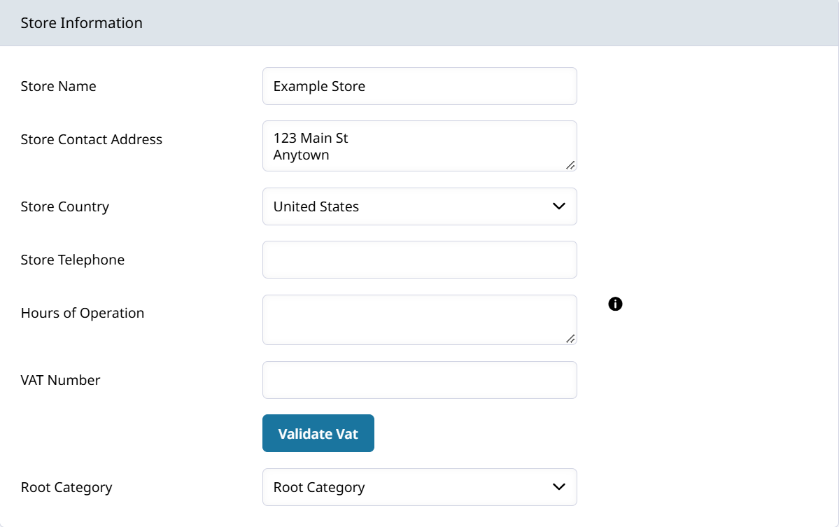
Zoey uses these details in the emails it sends your customers.
Shipping Origin
- Go to Orders > Settings and click Shipping Origin in the left menu.
- Enter the address you ship from: Country, Region/State, ZIP/Postal Code, City and Street Address.
- Click Save at the top right.
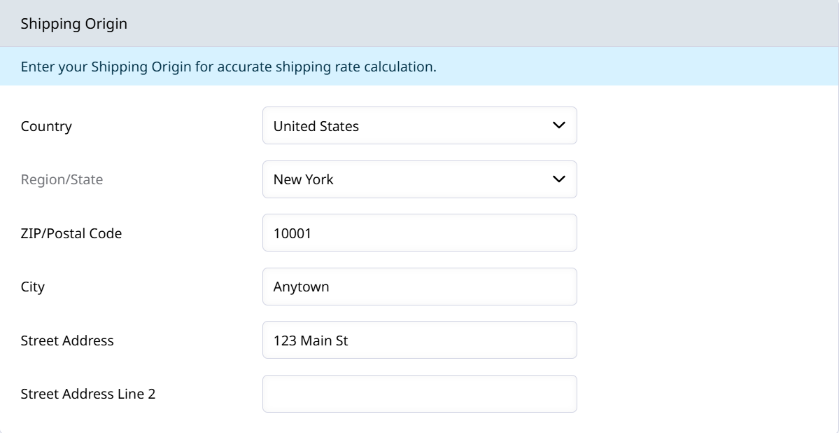
Live rates need a Shipping OriginUPS, FedEx and USPS calculate rates from this address. Without it, their rates don't show at checkout. See Fix 'No Shipping Method Found'.
Time zone, locale and currencies
- Set your time zone, date formats and the countries you sell to in Settings > Locale. The time zone is used on every order and invoice. See Locale Settings.
- If you sell in more than one currency, add them in Settings > Currency. See Set up currencies.
Add your details and logo everywhere customers see them
Store Information doesn't fill in every document. Also add your details and logo to:
- Emails: your logo and sender addresses in Settings > Emails. See Emails and Notifications.
- Order and quote PDFs: your logo and address in Orders > PDF Settings and Quotes > PDF Settings. See Print or download order PDFs and Quote PDFs.
- Your storefront: your logo in your theme. See Design your storefront.
To change the internal name of your store (shown in the admin and the mobile app), see Change your store name.
Ask Zoey AIAsk, for example: "Where do I enter my store's phone number?" or "Why don't UPS rates show at checkout?"
Related articles
Updated 36 minutes ago