
Ask Zoey (AI Assistant)
Ask about your store's data or how to do something in Zoey, in plain words, from any admin page. Ask Zoey can also make routine changes you confirm.
Ask Zoey is an AI assistant on every page of your Zoey Admin. Ask about your store's data or how to do something in Zoey, in plain words, and get an answer in seconds. It can also make a few routine changes for you, such as turning a product on or setting a price. Nothing changes until you click Confirm.
Use it to:
- Get a quick number without building a report: "How much did we sell last month?"
- Look up an Order, Account, Contact, quote or product without leaving the page you're on.
- Find out which customers, products or accounts stand out: top customers, past-due balances, low stock, slow sellers.
- Learn how to set something up in Zoey, with links to the support articles it used.
- Make small changes in bulk, such as turning 20 products off, after reviewing exactly what will change.
Open Ask Zoey
- In the Zoey Admin, click Ask Zoey, or press Ctrl + J (Cmd + J on Mac) on any page.
- Type your question and press Enter.
The panel docks on the right and the page stays usable beside it. Drag the panel's left edge to make it wider or narrower. The panel stays open as you move between pages, and Ask Zoey knows which page you have open, so you can ask about what's in front of you.
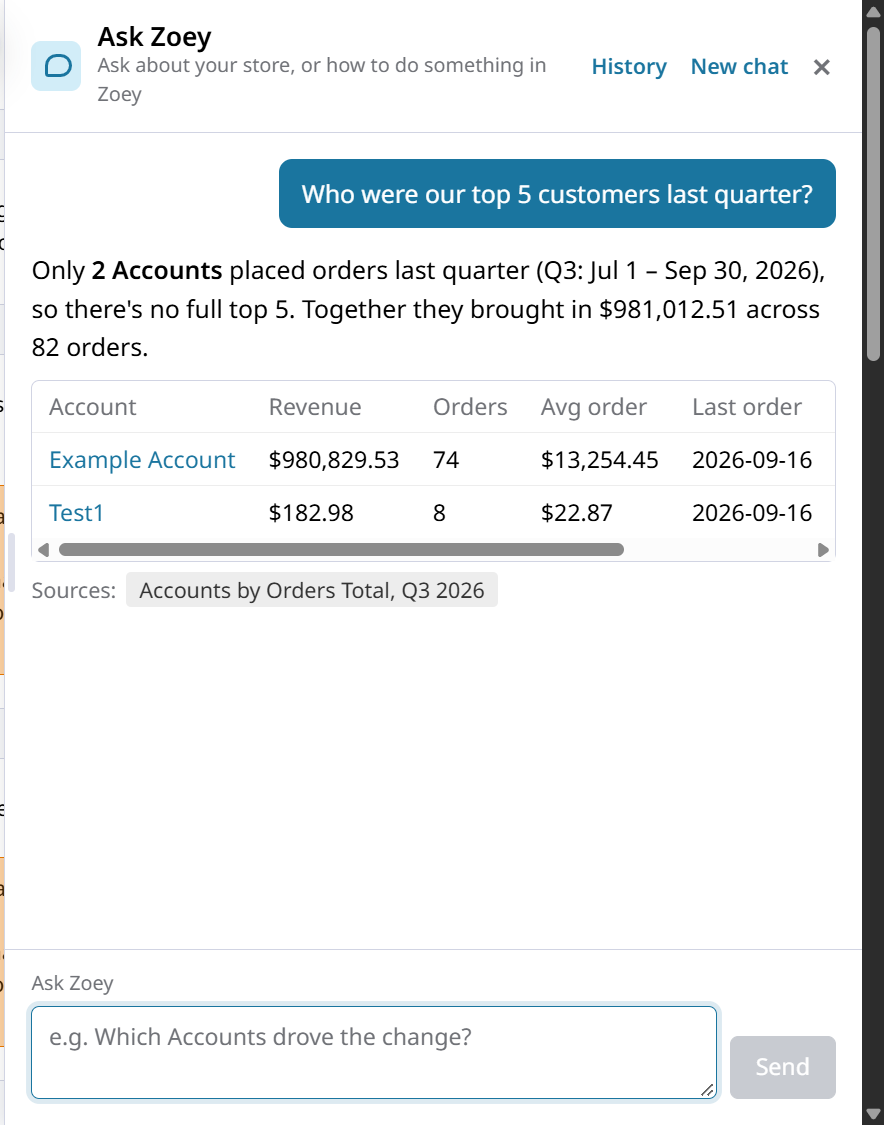
Press Ctrl + J (Cmd + J) again, or click ×, to close it.
Ask Zoey or Search anything?To jump straight to a record by its number, name or email, press Ctrl + K (Cmd + K on Mac) to use Search anything. See Search Everything from One Bar. Use Ask Zoey when you have a question rather than a record to find.
What You Can Ask
Ask Zoey reads your live store data and answers in plain language. Answers can include tables and links to the records and help articles it used.
| Ask about | For example |
|---|---|
| Sales | "How much did we sell last month, by Customer Group?" |
| Coupons and promotions | "Which coupons drove the most revenue in the last 90 days?" |
| Accounts and balances | "Which accounts are more than 60 days past due?" |
| Customers | "Who are our top 10 customers this quarter?" |
| Orders, quotes and records | "Show me open quotes for Example Account." |
| Products and stock | "What's low on stock?" or "Which products haven't sold in 90 days?" |
| How to do something in Zoey | "How do I set up a tier price?" |
For a question to start with on each report, see Running Reports with Zoey AI.
Get Better Answers
- Name the period. "Last month", "this quarter" or "since January 1" gets a precise answer.
- Say how to break it down. Add "by Customer Group", "by sales rep" or "by month".
- Follow up. Ask "Now only the Wholesale group" or "Show that by month" without starting over.
- Click through. Open the records Ask Zoey links to and check the details. For exact figures to file or share, use the report.
Changes Ask Zoey Can Make
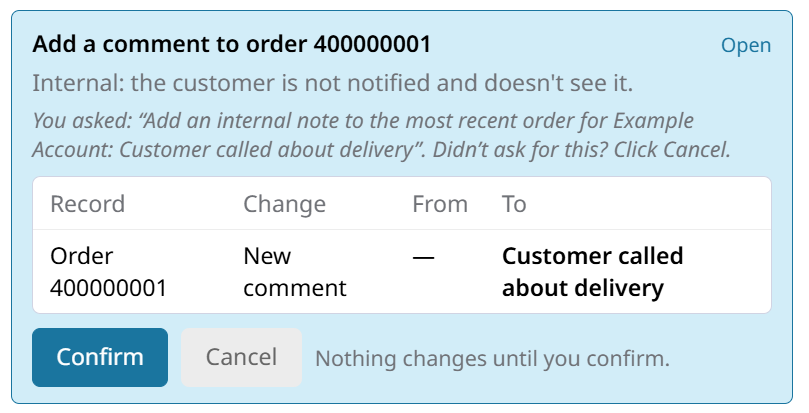
Ask Zoey can make these changes when you ask. It first shows a card listing each record and what will change, from the current value to the new one. Click Confirm to make the change, or Cancel.
| Change | For example | Limits |
|---|---|---|
| Turn products on or off | "Disable SKU ABC-100 and its variations" | Up to 50 products at a time |
| Set a product's price, special price, cost, quantity or stock status | "Set the cost of ABC-100 to 12.50" | Quantity and stock status are set on the variations of a configurable product, not the parent |
| Resend an Account invitation | "Resend Jane Example's invite, her link expired" | Only to Contacts of that Account with login turned on |
| Cancel quotes | "Cancel the expired quotes for Example Account" | Accepted quotes can't be canceled |
| Delete quotes | "Delete quote 100045, it was a duplicate" | Needs a reason and permission to delete quotes. Accepted quotes can't be deleted |
| Add an internal note to an Order | "Add a note to order 100123: customer called about delivery" | The customer isn't notified and doesn't see it |
Check the card before you confirm
- Ask Zoey makes the change exactly as the card shows, using the same steps as the admin page. A deleted quote can't be restored.
- A card expires after 15 minutes. If the records changed since the card was shown, nothing is changed: ask again for a fresh card.
- Changes are saved in the record's audit log with the user Zoey AI, and the details show which admin confirmed them. Order notes show Zoey AI (confirmed by your email**)** in the Order's history.
Ask Zoey doesn't take payments, issue refunds or credit, create or edit invoices, edit Orders or change settings. Ask it how, and it gives you the steps.
Permissions
Every admin can open Ask Zoey. It answers as you, so it only uses the data your admin role can see:
- To ask about sales, the role needs Reports.
- To ask about Accounts, Orders, invoices, quotes or products, the role needs access to that list in the admin.
- To make a change, the role needs permission to make the same change on the admin page.
- Customer Group, assigned Account, Sales Rep and product restrictions apply, the same as on the grids.
If your role can't see something, Ask Zoey says so. You can still ask how-to questions. To control what an admin can see, see Manage Your Team.
Conversations
- Closing and reopening the panel keeps the current conversation.
- When you open a new page within 24 hours, your last conversation reopens.
- Click History to reopen an earlier conversation, or New chat to start a fresh one.
- A conversation holds up to 50 questions. After that, Ask Zoey starts a new one and tells you.
- Conversations are kept for 90 days and are private to each admin user.
Good to Know
- Monthly allowance: each store has a monthly allowance of questions. Ask Zoey tells you when it's reached, and it resets at the start of the next month.
- Check important numbers: Ask Zoey reads your live data, but it can still misread a question. For figures you file, reconcile or share, open the report.
- Your data: your question and the data looked up to answer it are processed by Anthropic's Claude.
- Turning it off: Ask Zoey is on for every store. To turn it off, or to turn off the changes it can make, contact Zoey Support.
Related Articles
- Change Notices: the cards that explain what changed on an admin page.
- Running Reports with Zoey AI: ask about a report, with example questions for each one.
- Search Everything from One Bar: find any record with Ctrl + K.
Updated about 22 hours ago