
Change Notices
The cards on admin pages that explain what a Zoey release changed and how to do the job now.
When a Zoey release changes how an admin page works, a change notice on that page tells you what changed and how to do the job now. Notices appear only on the pages a release changed, so you learn about a renamed button or a moved setting where you use it.
Use it to:
- Find out why a button, menu or setting looks different from last week.
- Learn the new way to do a task without contacting support.
- Open the support article for a change with one click.
Where Notices Appear
A notice is a small card in the bottom-right corner of the admin page that changed. It isn't a pop-up: the page stays usable while it shows.
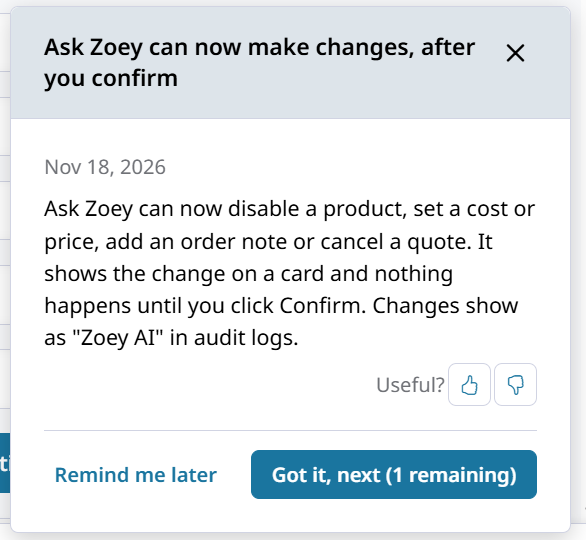
- The card shows one notice at a time, newest first. When several notices apply to the same page, read them one after another.
- Each notice shows its release date. A Changed badge marks something on this page that now works differently. Read these first, because a familiar step may no longer work the same way.
- Learn more opens the related support article in a new tab.
- Some notices appear when you open a specific window, such as a payment or invoice editor, instead of when you open a page.
A notice shows for about 30 days after its release, or until you mark it as read.
Read and Dismiss Notices
| Button | What it does |
|---|---|
| Got it, next | Marks this notice as read and shows the next one. On the last notice the button says Got it, then the card says You're all caught up. |
| Remind me later | Hides all notices for 3 days, on every device you sign in from. |
| × | Marks the notices on this page as read and closes the card. Notices for other pages still show when you open those pages. |
| ‹ Previous | Shows the notice you just read again. |
| 👍 / 👎 | Tells Zoey whether the notice was useful. Click the same one again to take it back. It doesn't dismiss the notice. |
A notice you've marked as read doesn't come back for you. Notices are tracked per admin user, so each person on your team sees them once.
Missed a notice?Search support.zoey.com for the feature, or ask Ask Zoey how to do the task now (for example, "How do I update an Account's billing terms?").
Related Articles
Updated about 22 hours ago