
Import products by CSV
Create or update products in bulk from a CSV in the Products list: import steps, Import Behaviors, the basic new-product template and templates for prices, stock, restrictions and more.
Create new products or update existing ones in bulk by importing a CSV file into the Products list. This guide covers the import steps and the templates for each kind of product data.
Use it to:
- Load your catalog when you set up your store.
- Update prices, stock, descriptions or any other product field for many products at once.
- Add group prices, tier prices, restrictions, related products and more with smaller, feature-specific templates.
Where to find it: In the Zoey Admin, go to Products > Products List. The import icon is to the right of Bulk Actions.
Before you start
- Save your file as CSV (Comma delimited) (*.csv). In Google Sheets, use File > Download > Comma Separated Values (.csv). For catalogs over about 10,000 products, Excel copes better than Google Sheets.
- New products need the columns in the basic template below. To update products, the only required column is
sku; add only the columns you want to change. Columns you leave out stay as they are. - Create your categories and attributes first. An attribute's code is its column header, and drop-down values must already exist in Zoey.
- Import one product first. A single test row shows mistakes before you import the whole catalog.
Import the file
- In the Zoey Admin, go to Products > Products List and click the import icon to the right of Bulk Actions. The Import Products window opens.
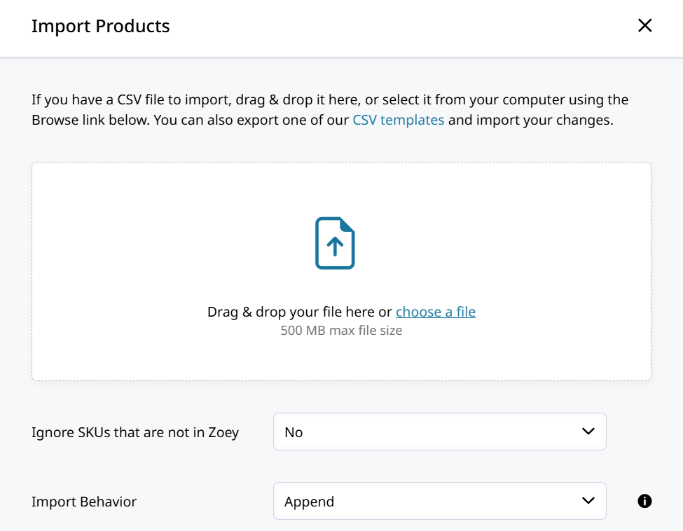
To only update products you already have, set Ignore SKUs that are not in Zoey to Yes: rows whose SKU isn't in your store are skipped instead of creating new products.
2. Drag your CSV into the window, or click to choose it. Zoey checks the file for errors.
3. When the file is valid, choose the Import Behavior:
- Append adds new products and updates existing ones. Use it for most imports.
- Replace also replaces a product's images, category assignments, related products and customizations with what's in your file.
- Delete Attributes, SKU Replacement and Delete All (Permanently) use their own file layouts. See Import Behaviors: Append vs Replace.
- Click Import.
If the file has errors, fix the rows Zoey lists and upload it again. Errors are normal on a first import. See Fix CSV import errors.
Changes usually show on your storefront within a couple of minutes, because indexing is automatic. If they don't, flush the cache.
Delete All (Permanently) can't be undoneIt deletes every SKU in your file. Disable products you no longer sell instead, so their order history and reports stay intact.
Basic template for new products
Every new product needs these columns. Product CSV Fields & Values explains each column and its allowed values.
| sku | _type | name | description | price | status | qty | visibility | is_in_stock | use_config_manage_stock | manage_stock | tax_class_id | weight | category_ids | image | _media_image |
|---|---|---|---|---|---|---|---|---|---|---|---|---|---|---|---|
| Product1 | simple | Simple Product 1 | Simple Product 1 | 10 | 1 | 9999 | 4 | 1 | 1 | 1 | 2 | 1.5 | 26,35,57 | /products/product1.jpg | /products/product1.jpg |
- Save a copy of the basic product template to your Google Drive. Its Guide tab explains each column, and Blank Template has only the headers.
- Name must be unique: it shows on your store, orders, invoices and shipments. Description is the longer web description; it can repeat the name and can contain HTML.
- For image paths, see Import product images.
- To add your own fields, such as Brand, create the attribute first, then add a column named with its code (for example
brand).
Templates for other product data
Each of these imports only needs sku plus the template's own columns, so you can add them to the basic file or import them separately.
| Data | Template | How it works |
|---|---|---|
| Configurable products and variations | See Import configurable products by CSV | Parents, variations and how they link |
| Customer Group prices | Download template | Set customer group prices |
| Tier (quantity) prices | Save a copy | Set tier (quantity) pricing |
| Stock and backorders | Download template | Inventory settings |
| Minimum and maximum quantities | Download template | Set minimum and maximum quantities |
| Quantity increments and packaging | Download template | Quantity Increments, Packaging and Decimal Quantity |
| Product restrictions | Download template | Restrict products to specific customers |
| Related, up-sell and cross-sell products | Save a copy | Add related, up-sell and cross-sell products |
| Downloadable products | Download template | Import downloadable products |
| Category assignments | category_ids column in the basic template | Assign products to categories by CSV |
Start from an exportTo update products you already have, tick them in Products > Products List, then choose Bulk Actions > Export > Export Full Product Data. Keep
skuand the columns you want to change, edit them and import with Append.
FAQ
How do I update only prices or stock?
Use a file with just sku, price and qty (or any one of them). To start from your current data, tick the products in Products > Products List, choose Bulk Actions > Export > Export Basic Product Data, edit the file and import it with Append.
Are there rules for SKUs?
Each SKU must be unique and no longer than 64 characters. If you sync with QuickBooks or NetSuite, use the same SKUs as in that system.
What happens to images if the original link stops working?
Nothing. Zoey copies each image when you import it, so it doesn't depend on the source link afterwards. See Import product images.
Do I need a separate SKU for cases or pallets?
No. Sell by the case, box or pallet with packaging on the same SKU. See Quantity Increments, Packaging and Decimal Quantity.
Can I copy an existing product instead of importing?
Yes. Open the product and use Duplicate from the menu next to Save. See Duplicate a product.
Ask Zoey AIAsk, for example: "Which columns do I need to import new products?" or "Which products don't have a weight?"
Related articles
Updated 35 minutes ago