
Product CSV Fields & Values
In this article you will find a guide to the various columns and their uses found in your Product CSV files.
Note that these are case-sensitive and values should not be capitalized unless you have made them that way such as a Category Name or Attribute value.
| Header | Use | Example |
|---|---|---|
| sku | As this suggests, your product's SKU (Stock Keeping Unit) goes here! This must be a Unique value. | 100123 |
| What type of product is this? Your options are: simple, configurable, virtual, downloadable, grouped or bundle. | simple |
| The Category and Subcategories that this product will live in | Men/Outerwear/Overcoat |
| sort_order | To sort the Products within Categories. | |
| cost | The cost for the vendor. Does not apply to Bundle or Group products. | 3.41 |
| description | The long description with detailed information regarding the product. HTML is accepted through CSV import to this field. | Sourced from local farmers and made with all organic components... |
| image | Link to your already uploaded image. You will also find Small and Thumbnail to set these images apart from the base image. Note that you can not upload your images through a CSV file. | /p/r/product1.jpg |
| image_label | The label that will appear when one hovers over the image | Seafoam Green |
| meta_description | Information or short sentences that helps describe your product's page to search engines. | Wool sweaters just in time for the holidays! |
| meta_keyword | Words that help describe your page to search engines. | Wool |
| meta_title | Title to describe your page to search engines. | Wool Sweaters |
| minimal_price | Your "As Low As" Price | 9.99 |
| msrp | Manufacturer's Suggested Retail Price | 49.99 |
| msrp_enabled | Enables Manufacturer's Suggested Retail Price (MSRP) and Manufacturer's Actual Pricing (MAP) rules. | Yes or No |
| msrp_display_actual_price_type | Specifies where the actual price is displayed. | In Cart, Before Order Confirmation, On Gesture, or Use Config |
| name | Your Product's name | Unisex Dinosaur Socks - TRex |
| price | What the customer sees as the price | 10 |
| short_description | The shorter description that appears to the right of the Product Image on the Product page. | 10% Recycled cardboard, please see additional information for more on our sources. |
| special_price | Sale Price for an item, not associated with a catalog sale | 1.99 |
| special_from_date | Beginning dates for the special price (Sale Price) | YYYY-MM-DD 2017-02-13 |
| special_to_date | End dates for the special price (Sale Price) | YYYY-MM-DD 2017-02-14 |
| status | Is the product Enabled or Disabled? Enabled is 1, Disabled, 2 | 1 |
| tax_class_id | Tax code if you sell taxable goods (2) or charge for shipping (4). For non taxable goods use 0 | 2 |
| url_path | The URL key that will show up after youstorename.com/ | maxi-dress-and-jacket |
| visibility | How will the customer be able to view this item? Catalog & Search, Not Visible Individually? Visible in Catalog and Search = 4 Visible in Catalog = 2 Visible in Search = 3 Not visible individually = 1 | 4 |
| sellable_individually | Can the product be sold individually through the Category page or Product page? Default = Blank (no value in column needed, product will default to global default) Yes = Yes No = No | No |
| weight | The weight of the item to be used with your shipping calculations. | .05 |
| qty | How many of this product do you have in stock? | 100 |
| min_qty | When the item's stock reaches this number, it will become out of stock. | 0 |
| is_qty_decimal | Choose whether the product can be sold using decimals (e.g., you can buy 2.5 product) 0 for no, 1 for yes | 0 |
| display_child_sku | Whether the SKU displayed on the Product Page should show the Variation SKU selected | 0 = No 1= True |
| min_sale_qty | Minimum number of items in the shopping cart to be sold | 0 |
| max_sale_qty | Maximum number of items in the shopping cart to be sold | 100 |
| is_in_stock | Defines whether the product is available for selling (0 - Out of Stock, 1 - In Stock) | 1 |
| notify_stock_qty | The number of inventory items below which the customer will be notified via the RSS feed | 5 |
| use_config_manage_stock | Choose whether to view and specify the product quantity and availability and whether the product is in stock management( 0 - No, 1 - Yes) | 1 |
| stock_status_changed_auto | Defines whether products can be automatically returned to stock when the refund for an order is created ( 0 - No, 1 - Yes) | 0 |
| qty_increments | The product quantity increment value | 1 |
| enable_qty_increments | Defines whether the customer can add products only in increments to the shopping cart ( 0 - No, 1 - Yes) | 0 |
| is_decimal_divided | Defines whether the stock items can be divided into multiple boxes for shipping. | |
| zoey_product_skip_shipping | Defines whether a Configurable Product or its individual Variations should skip shipping. To enable this feature go to Product->Settings->Inventory->Advanced Options and then change Enable Non-Shippable Products to "Yes". By default this will be "No". | Yes No |
| The SKU of the products you want as Related | 1234 |
| The SKU of the products you want as Cross Sell | 4567 |
| The SKU of the products you want as Up Sell | 7890 |
| The SKUs of the Simple Products that will be linked to this bundle Product | AB-12 |
| Default number for the bundle product's simple component | 8 |
| display_child_sku | In a configurable product when a variation is selected what is the behavior with respect to the SKU displayed |
|
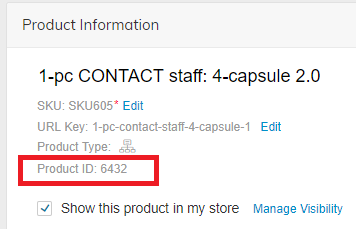
| zoey_default_variation | The default variation to show when a configurable product is first loaded | Variation Product ID - Where Variation Product ID is the Entity ID which you can get by exporting your Products or looking at the Product ID in the Admin - see image below |
| zb2b_product_atq_restricted | Hide Add To Quote button for this product. Yes - hide, No - don't hide. | Yes No |
| zb2b_product_restricted | Enable Product Restriction for this product. Product will be hidden based on B2B > Product Restrictions for the below groups. | Yes No |
| zb2b_restricted_prod_groups | Multi-select customer groups to apply restriction to. Leave blank for all. | Customer Group NAME i.e. "Wholesale" |
| zoey_add_to_cart_qty | Default quantity to be displayed in the quantity box on a product page | Numerical value, example: 1 |
| Tier & Group pricing information. We highly recommend setting up a sample / test run product with this information from your control Panel before you start on updating this through CSV |
| Custom Option information. We highly recommend setting up a sample / test run product with this information from your control Panel before you start on updating this through CSV |
| Configurable Product Information. We highly recommend setting up a sample / test run product with this information from your control Panel before you start on updating this through CSV. You should have one already set up in your store as test information. |
You may have other attributes in here such as color, size, country_of_manufacture, manufacturer. All of these will be determined on the Attribute Set that you are using as well as the Attributes you have already set up.
Item ends with _position. Set a number to decide which choice will come first, second, third and so on.
User Default SettingsAny line that begins with useconfig you can enter as "Use config" to use your default settings.
HTMLUsing HTML in your CSV files may cause issues with the import itself or the imported data. Please note the Support Team is not able to troubleshoot or assist with issues related to HTML in CSV files.
Updated about 2 months ago