---
updatedAt: 2025-05-30T13:49:35.000Z
agentTools:
projectIndex: https://support.zoey.com/llms.txt
---
# Accounts - Importing Accounts & Contacts
To import your existing customer data into Zoey, you must format your files properly. This tutorial will tell you what attributes you need to include in order to successfully import a file.
The file that you upload must be in CSV (Comma Delimited) (\*.csv) format.
## The Template
**Please use the Guide for instructions on what each column header means and required fields.**

### How To Use This Template
Please Save a Copy of this template below.\
The Template will have 2 Tabs:
* **Guide** - This tab will provide requirements and tips for each column in the template.
* **Blank Template** - This tab will only contain the column headers for you to copy/paste your data into.
> 👍 *[Click Here to Save A Copy Of This Accounts Template to your Google Drive](https://docs.google.com/spreadsheets/d/1gTGpiDeMNZ1LL-gLeQhM1J7JytbxmcFbwA3hGI1AeXg/copy?usp=sharing)*
>
> **OR** [Download the Blank Account Import Template as CSV](https://docs.google.com/spreadsheets/d/19KjfgRqFreDtJZzrQs9ntN2RqXYbTUatoNfK6s5pnXE/export?format=csv\&gid=1202799791)
## Using the Importer
**Step 1**: Prepare your file for import
> 🚧 Save Your File as a Comma Delimited CSV
>
> If using Excel there are several CSV options. Please use CSV (Comma Delimited) (\*.csv)
Google Sheets only has one CSV option: Comma Separated Values (csv)
**Step 2:** Click on the Importer Icon, to the right of the Search bar and Bulk Actions.
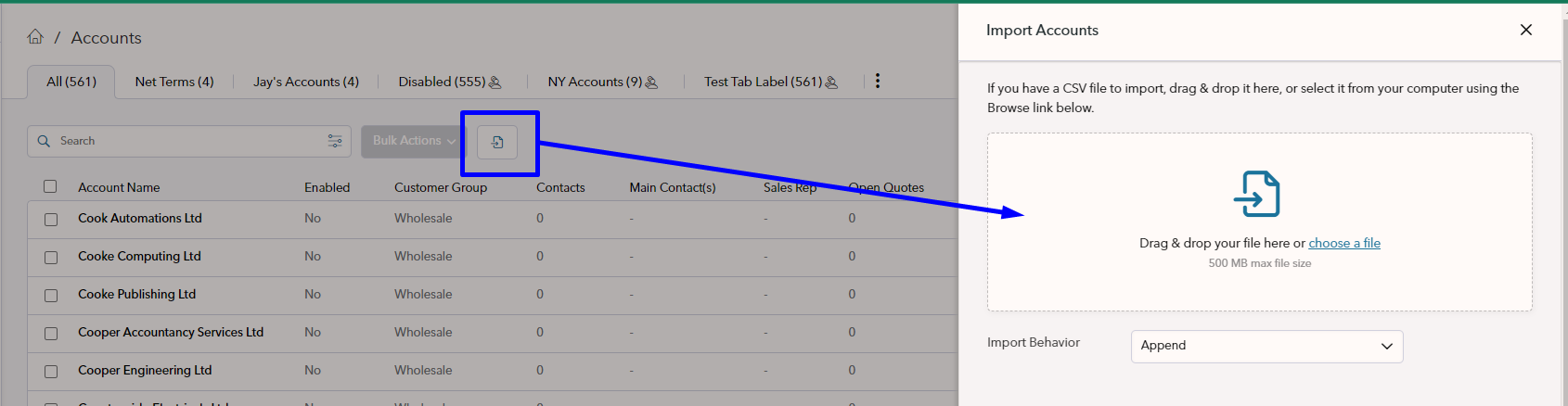
From here you can upload your file, use the Append Import behavior.
If you get any error messages, don't panic! This is normal and common. Please fix the field(s) on the line(s) stated in the message and reimport your file.
When there are no import errors, click **Import**
> ❗️ If updating or re-importing Accounts, please use the Replace import behavior
>
> If address columns exist in the spreadsheet, **Append might duplicate any addresses** that have already been imported.
> 👍 Zoey has separate, smaller, import templates when you only want to add [Contacts](https://welcome.zoey.com/docs/importing-contacts), Bill Tos or Ship Tos to existing Accounts!